
EN
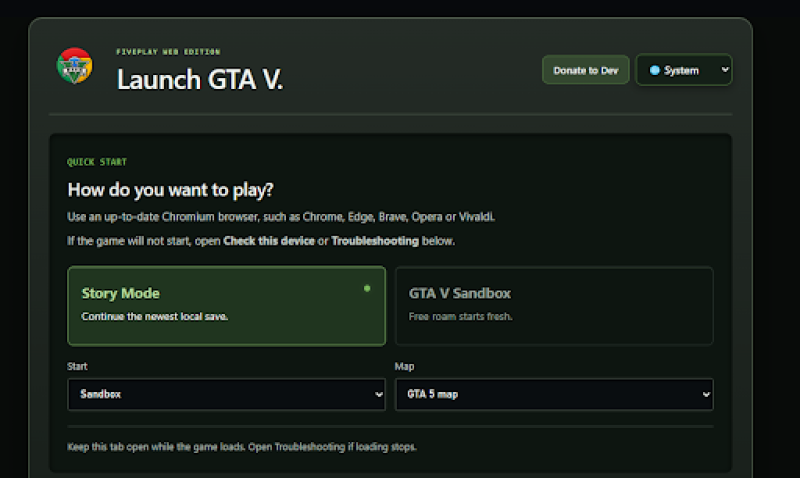
Short answer: v2.fiveplay.lol is not an official way to play GTA V, and parts of it carry real security risks. It is an unofficial browser launcher that claims to run GTA V in Chrome or Edge, but it is not authorised by the game's publisher, it runs an ad network known for pop-ups, and one of its features asks users to install a trusted root certificate on their computer. That last step alone is reason enough to be very careful.
v2.fiveplay.lol brands itself "FivePlay Web Edition" and invites visitors to "Launch GTA V." The launcher page asks how you want to play, recommends an up-to-date Chromium browser such as Chrome, Edge, Brave, Opera or Vivaldi, and points to "Check this device" or "Troubleshooting" if the game will not start.
It is far more elaborate than most fake game pages. The launcher offers single-player Story and Sandbox modes, a two-player multiplayer beta, graphics settings, save exports, a mod importer for ZIP, RAR and 7z files, and a built-in Menyoo trainer. Internally, the page is titled "$GrandV — Local Launcher," and it asks for optional crypto donations in Solana, Bitcoin, Ethereum and TRON.
The main domain behind this launcher, fiveplay.lol, has already been flagged. A MalwareTips URL scan rates it High Risk. The scan says the domain was only one day old when checked, that two antivirus engines flagged the URL as suspicious, and that its main concern is the request to install a root certificate. It also found no independent scam reports or credibility records for the site. v2.fiveplay.lol is a subdomain of that same site.
The launcher includes a "Connect to this LAN host" option. It tells Windows users to download a file called lan-root-ca.cer and install it under Trusted Root Certification Authorities, then restart Chrome or Edge. It gives similar steps for macOS, Linux and Chromebook.
This is a serious request. A trusted root certificate tells your computer to accept any website security certificate signed by its owner. In the wrong hands, that can allow someone to impersonate websites or read encrypted traffic, including logins and banking sessions, on networks they control. The site says it does not change trust settings automatically, but that does not make the step safe. A browser game should never need it.
The page's code also includes a verification tag for Monetag, an advertising network widely used for pop-under ads, push notification prompts and redirect ads. That fits the pattern of sites that earn money from traffic rather than from the game itself.
It might, at least for a while. Unlike many fake GTA pages, browser versions of GTA V have genuinely been shown running. On October 6, 2026, an unofficial site called playgta5.com briefly made the game playable in Chrome, according to God is a Geek. Lowyat.NET reported that it ran locally using browser technologies such as WebAssembly, after downloading around 700MB of data. The site was taken offline within hours, and its owner later asked online who wanted the source code. MalwareTips also notes that another site calls fiveplay.lol the project's new "official domain."
That history suggests FivePlay may be one of several copies or continuations of that leaked port. Even so, whether it works on your device is far from certain. The launcher itself warns that the game may not start, needs an up-to-date Chromium browser and modern graphics support, and tells you to keep the tab open while it loads. Its long troubleshooting section, low-spec presets and "Check this device" tool suggest that crashes and failed loads are common.
Mods add another layer of risk. The launcher lets users import ZIP, RAR and 7z archives from anywhere. Game mod files shared online are a well-known way to spread malware, so only use files from sources you trust.
GTA V is owned by Rockstar Games and its parent company, Take-Two Interactive. It is sold through authorised stores and platforms, and there is no official browser version. A site that streams or downloads the full game for free, without you owning a copy, almost certainly uses Rockstar's game files without permission.
Take-Two moves quickly against projects like this. HotHardware reported that Rockstar issued DMCA strikes against playgta5.com and against users posting videos of it, and God is a Geek noted that Take-Two had a browser version of GTA: Vice City pulled from DOS Zone in December 2025. Any saves or mods you build on FivePlay could disappear the moment the site goes down.
The "$GrandV" name and the request for crypto donations in Solana, Bitcoin, Ethereum and TRON add to the uncertainty. Crypto donations to an anonymous operator cannot be reversed if anything goes wrong.
Buy or stream GTA V only through official platforms such as Steam, the Epic Games Store, the Rockstar Games Launcher, PlayStation, Xbox or licensed cloud gaming services. Never install a certificate, launcher, extension or "plugin" that a game website asks for. Do not allow browser notifications from game sites, and never enter your Rockstar, Steam, Google or Microsoft login on an unofficial page.
If you already installed the FivePlay certificate, remove it straight away. On Windows, open "Manage user certificates," go to Trusted Root Certification Authorities, find the certificate you imported and delete it. On macOS, delete it in Keychain Access. Then change important passwords and run a security scan. Before trying any unfamiliar game site, check it with a website checker, and Report a Scam if it caused you harm.
Likely not. FivePlay may load a version of GTA V, but it is unofficial, likely to be taken down, and wrapped in pop-up ads. Most importantly, it asks users to trust a root certificate from an anonymous, brand-new site. No game is worth that risk.
This article has been written by a scam fighter volunteer. If you believe the article above contains inaccuracies or needs to include relevant information, please contact ScamAdviser.com using this form.
Adam Collins is a cybersecurity researcher at ScamAdviser who operates under a pseudonym for privacy and security. With over four years on the digital frontlines, he specialises in translating complex threats into actionable advice. His mission: exposing red flags so you can navigate the web with confidence.
