
EN
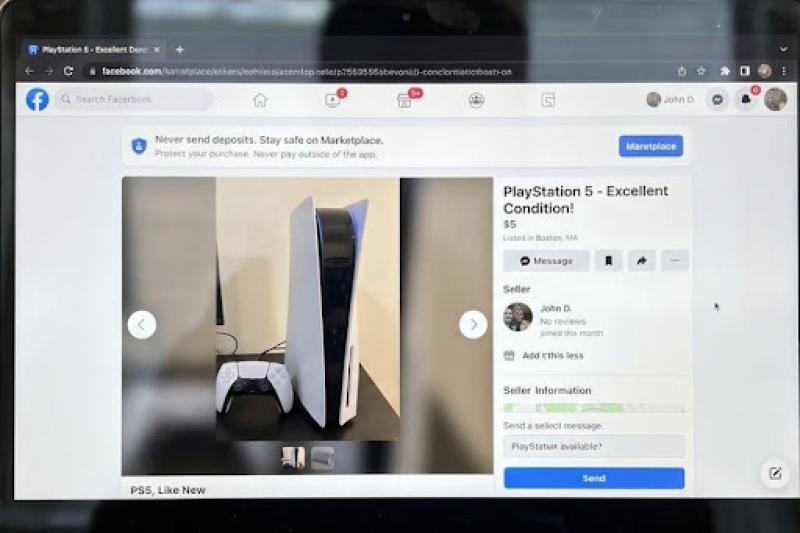
Second-hand marketplaces are full of genuine bargains, and full of people pretending to sell them. A fake seller needs only a few stolen photos, a low price and a new account. Once you pay outside the platform, your money is usually gone.
Most marketplace scams follow the same script. Learn the script and you can check any seller in a few minutes.
Marketplaces feel personal. You chat with a real-sounding person, often in your area, about a specific item. That makes it easy to forget you have no idea who they are.
Scammers exploit two gaps. First, anyone can open an account in minutes. Second, buyer protection only applies when you pay through the platform. Most scams are designed to push you out of the platform and into a payment you cannot easily reverse.
On Facebook, tap the seller's name to view their Commerce Profile and see when they joined Facebook. On Vinted, check how long the member has been active and when they were last online. A profile created this month that sells a high-value item is a serious warning sign.
Tip: Treat a brand-new account selling phones, consoles, designer bags or concert tickets as high risk.
Genuine sellers build up reviews over time. Look for a reasonable number of ratings, recent dates and comments that mention real items. Zero reviews is not proof of a scam, but it means you have to rely on the other checks.
Tip: Read the negative reviews first. Comments such as "never shipped" or "asked me to pay outside the app" tell you everything.
Real people sell a random mix of their own things. Scam accounts often list many of the same high-demand item, all new, all below market price. Some also list items in several cities at once.
Tip: If a private seller has five "brand new, sealed" iPhones, they're not a private seller.
Scammers copy photos from other listings, shops and Google Images. Run the photos through Google Lens or TinEye. If the same picture appears in another listing or a shop, the seller probably doesn't own the item.
Tip: Ask for a new photo of the item next to a piece of paper with your name and today's date. A real seller can do this in a minute.
A PS5 at half price or a designer bag at 80% off is bait. Check the going rate on the same platform and on eBay sold listings. Prices far below everyone else's are a red flag, even if the story sounds good, such as moving abroad or an unwanted gift.
Tip: A sad or urgent story attached to a cheap price is a common scam combination.
This is the most important check. On Vinted, payment should always go through the Vinted app, which holds the money until you confirm the item arrived. On Facebook, Purchase Protection only covers eligible items bought with Facebook checkout. Cash at a local meetup is fine once you've seen the item.
Walk away if the seller asks for a deposit, a bank transfer, PayPal "Friends and Family", Zelle, gift cards or crypto. These methods offer no built-in buyer protection and are very hard to reverse.
Tip: A seller who says the app's fees are too high and offers a discount to pay directly is trying to remove your protection.
Scammers ask to continue on WhatsApp, Telegram or email. Outside the app, they can send fake payment links, fake courier pages and fake "Vinted" or "Facebook" emails without being flagged.
Tip: Keep every message inside the app. If the platform needs to investigate, it can only see what happened there.
Never click a payment, shipping or "verification" link sent in chat. These lead to fake pages that steal card details or bank logins. Also, never share a verification code sent to your phone. Some scammers use it to take over your account or set up a phone number in your name.
Tip: Real Vinted and Facebook payments happen inside the app. You never need to open a link to buy or get paid.
Before you pay:
It can be, if you check the seller and either use Facebook checkout or pay cash after seeing the item in person.
Yes, when you pay through the Vinted app. Vinted Buyer Protection doesn't apply to payments made outside Vinted.
Deposits are a common scam tactic. A real seller can wait until you meet or until you pay through the app.
No. Vinted payments happen in the app. A link sent by a seller or buyer is a phishing page.
If you used platform checkout or a credit card, you have a good chance. Bank transfers, gift cards and crypto are rarely recoverable.
Related reading: 14 Facebook Scams to Watch Out For · 10 Legit and Reliable Online Marketplaces · How to Recognize a Scam
Adam Collins is a cybersecurity researcher at ScamAdviser who operates under a pseudonym for privacy and security. With over four years on the digital frontlines, he specialises in translating complex threats into actionable advice. His mission: exposing red flags so you can navigate the web with confidence.
