
EN
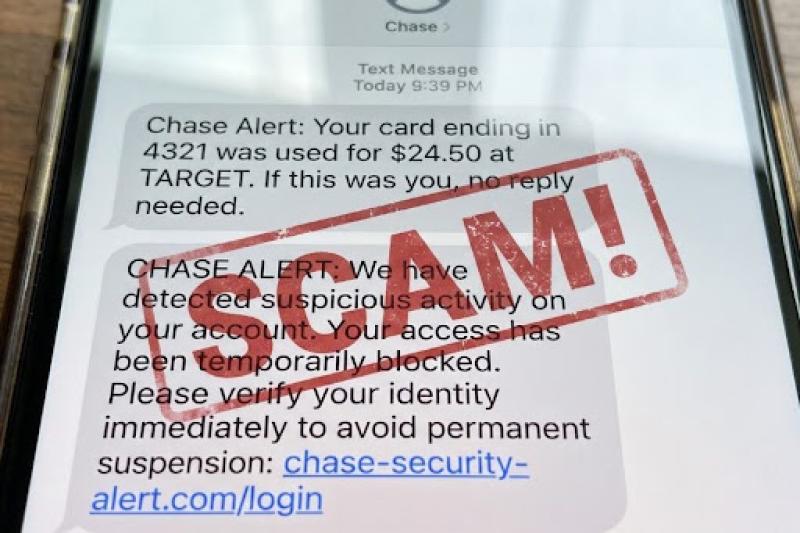
A fake bank text can land in the same message thread as your real bank's alerts, with the right name at the top. Scammers use a trick called sender ID spoofing to do this. So the thread it appears in tells you nothing.
What does give a fake away is what the message asks you to do. Real banks send alerts. Scammers send instructions.
The text warns of a problem: a suspicious payment, a blocked card or a new device on your account. It includes a link to "secure your account". The link leads to a perfect copy of your bank's login page.
When you log in, the scammer captures your details. Often they then call you, pretending to be the bank's fraud team, to get the one-time code they need to approve a payment. The text and the call are two halves of the same scam.
Many banks have stopped putting links in texts altogether, precisely because of smishing. Even if yours still does, the safest rule is never to log in from a text link.
Tip: Open your bank's app or type its address yourself. If there's a real problem, you'll see it there.
Scam links use look-alike addresses such as yourbank-secure-login.com or yourbank.verify-account.net, or short links that hide the destination. Look closely at the domain name directly before the standard ending (such as .com or .co.uk) and before the first forward slash /. If extra words or hyphens have been added, it's a fake.
Tip: Long-press the link to preview it without opening it. If it's not your bank's exact official domain, delete the text.
"Your account will be suspended in 24 hours." "Reply now to stop a £950 payment." Real fraud alerts are calm and factual. Scam texts are built to make you panic and act before you check.
Tip: A real fraud alert can wait the two minutes it takes you to open your banking app.
Your bank already knows your details. It will never ask you to send your PIN, full password, card number or one-time passcode by text, phone or email.
Tip: If a message asks for a code you just received, it's a scam, every time.
In a "safe account" scam, the caller or text claims your account has been compromised and asks you to transfer your money to a new account to protect it. That account belongs to the scammer. No bank ever does this.
Tip: Any request to move money "for safety" is a scam. Hang up and call your bank.
Scammers send texts in bulk, so many people receive messages from banks they've never had an account with. This is the easiest giveaway.
Tip: Report it anyway, even if it's not your bank. Your report helps block the number.
Real bank alerts usually come from a short code or the bank's name. A text from a normal mobile or international number claiming to be your bank is almost certainly fake. Remember, though, that a bank's name in the sender field doesn't prove the reverse.
Tip: Check how your bank's genuine texts normally look. Many banks publish this on their security page.
Scam texts are often generic: "Dear customer", no last digits of your card, or an amount and shop you don't recognise. Real alerts usually reference a specific transaction you can confirm in your app.
Tip: If the transaction in the text isn't in your app, the text is the problem, not your account.
Yes. Sender ID spoofing lets scammers use your bank's name, so the text lands in the same thread. The thread is not proof.
No. Replying confirms your number is active. Report and delete instead.
Some still do, but the safest habit is to never log in through one. Always use the app.
The risk is low, but close the page, don't enter details and keep your phone updated. Call your bank if you're unsure.
It depends on your country and how the payment happened—for example, UK rules offer strong mandatory reimbursement protections for bank transfer scams, whereas protections elsewhere vary. Report it as fast as you can, because quick reports always give you the best chance.
Related reading: What Are Safe Ways To Pay Online? Which Payment Methods Are Dangerous?
· How to get your money back · How to Recognize a Scam
Adam Collins is a cybersecurity researcher at ScamAdviser who operates under a pseudonym for privacy and security. With over four years on the digital frontlines, he specialises in translating complex threats into actionable advice. His mission: exposing red flags so you can navigate the web with confidence. See Full Bio
