
EN
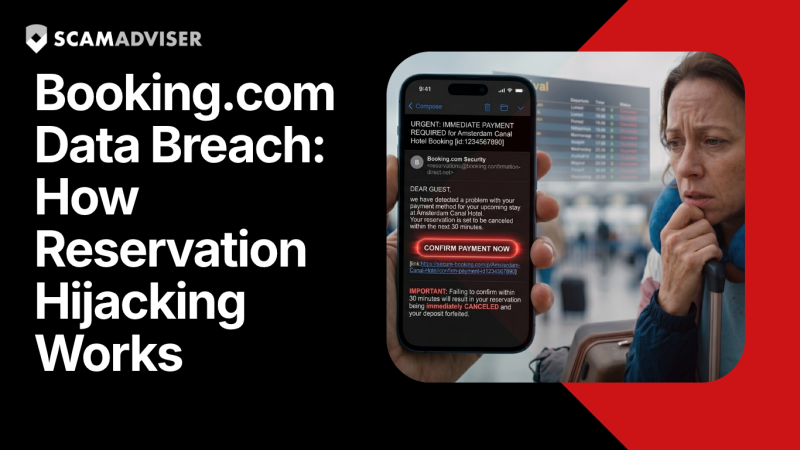
On April 13, 2026, Booking.com confirmed a data breach exposing customer names, email addresses, phone numbers, and full travel itineraries. Scammers are already using this data to target victims. If you have ever used Booking.com, read this article in full.
In a Nutshell
Most scam warnings go like this: be careful of suspicious emails. Don't click strange links. Use common sense. That advice, while correct, assumes you'd be able to spot something suspicious in the first place.
The Booking.com data breach of April 2026 is different — and far more dangerous — because it strips away every clue you normally rely on. The scammer knows your real name. They know which hotel you booked. They know your check-in date, your phone number, and potentially what you communicated privately with the property. When they contact you pretending to be Booking.com support or the hotel's front desk, the message isn't vague or generic. It's about your trip, your exact reservation, your upcoming stay. That's what makes "reservation hijacking" — in the words of security researchers — feel like "routine customer service."
At ScamAdviser, we don't stop at the news cycle. We break down the mechanics so you understand what's really happening, and we give you a tested action plan to stay safe. Let's get into it.
On the evening of Sunday, April 13, 2026, Booking.com began notifying an undisclosed number of customers by email that "unauthorised third parties" had gained access to reservation data. According to the company, the breach was first identified after "suspicious activity" was detected linked to certain reservations.
The data exposed includes customer names, email addresses, phone numbers, booking confirmation details, travel dates, and the names of hotels booked through the platform. Booking.com has stated that financial and payment information was not compromised, and that they immediately reset security PIN codes for all affected and past reservations.
500M+
Monthly visits to Booking.com — scale of potential victim pool
1.1B
Nights booked on Booking.com in 2024
$5,000
Max price stolen Booking.com credentials sell for on dark web forums
€475K
Fine paid by Booking.com after failing to report a 2018 breach on time
What Booking.com has not confirmed is how many customers were affected, in which regions, or exactly how the breach occurred. Critically, some users on Reddit reported receiving targeted phishing messages containing their real booking details two weeks before the official notification was sent — suggesting the data was in criminal hands and being actively exploited well before Booking.com informed its customers.
"The accuracy of the stolen data makes these scams feel like routine customer service, making it far easier to trick even tech-savvy travellers."
— Luis Corrons, Security Evangelist, Norton
Understanding the full attack chain is the most powerful protection you have. Here is exactly how reservation hijacking unfolds, from initial compromise to the moment money leaves your account.
Hackers gain access to reservation data — either through a direct platform breach (as appears to have happened here) or by compromising hotel partner accounts using phishing and credential-stealing malware. Research by Sekoia documented one such campaign called "I Paid Twice," in which attackers infected hotel computers with PureRAT remote-access trojans, giving them full control of the hotel's Booking.com extranet. Stolen credentials are then sold on dark web forums for between $30 and $5,000, depending on the hotel's tier and number of active bookings.
Scammers are patient. They don't rush. They monitor your reservation and time their attack for maximum psychological pressure — typically 2 to 5 days before your check-in, when cancelling feels catastrophic and you're most likely to act fast without thinking. David Shipley, CEO of cybersecurity firm Beauceron Security, describes it plainly: "They know you're booking. They wait for it to get close to the date. They email you convincingly that your booking has been cancelled and you need to contact them immediately. That is stressful. Now we're in panic mode — and that's when we start to make mistakes."
The message arrives via WhatsApp, SMS, email, or — in more sophisticated attacks — directly through Booking.com's own in-app messaging system (when a hotel's account has been compromised). Because it comes through legitimate infrastructure or references verified personal data, it bypasses every instinct you have for identifying scams. Victims report messages from senders claiming to be "check-in managers" or Booking.com "account security teams."
Modern reservation hijacking scam messages are polished, grammatically perfect, and precisely personalised. AI-powered tools allow criminals to generate thousands of these messages at scale, each tailored to the victim's specific booking details. Gone are the days of obvious typos and broken English as reliable red flags.
The message claims there is a problem: a payment issue, a card verification error, a system update requiring card re-entry. You are told your reservation will be cancelled within 12 or 24 hours unless you act. A link — which may even contain "bookingcom" in the URL — takes you to a pixel-perfect fake payment page.
Victims who enter their card details on the fake page have them immediately skimmed. In some variants, victims are told to make a direct bank transfer "to secure the reservation." Once the transfer is made, the money is gone. There is no reservation problem. There never was. Note: Booking.com will never ask you to share card details via WhatsApp, email, SMS, or phone, and will never request a bank transfer.
The reason reservation hijacking is so effective is that it exploits contextual trust — the psychological assumption that someone who knows your specific, private travel details must be legitimate. This is the precise reason data breaches are described as a "gold mine" for fraudsters. The data doesn't just enable fraud; it makes fraud feel indistinguishable from genuine customer service.
Many readers will feel blindsided by this breach. They shouldn't have to be — because this is not the first time Booking.com customers have been put at risk in exactly this way, and the travel industry more broadly has become a repeat target for criminal data harvesting.
Year Incident Impact 2018 Booking.com hotel employee phishing campaign 4,000+ customers' data stolen, including 300 credit cards. Booking.com fined €475,000 in 2021 for 22-day delay in reporting the breach. 2023–2024 Compromised hotel extranet accounts used to contact guests UK's Action Fraud received 532 reports, totalling approximately £370,000 in losses. Nov 2025 Sekoia documents "I Paid Twice" campaign — PureRAT malware targeting hotel staff Thousands of hotel extranet accounts compromised across Europe; guests contacted via WhatsApp with real booking details. Jan 2026 Eurail data breach Passport numbers, addresses, and for some travellers, ID photocopies and health data exposed. Apr 2026 Booking.com direct platform breach (current) Undisclosed number of customers notified; financial data reportedly not accessed. Active phishing campaigns already reported.
The pattern is clear: the travel industry collects an unusually rich combination of personal data — where you are going, when, with whom, what you requested, and how you paid. For criminals, a travel platform database is not just a list of names and emails. It is a map of real-world movements and plans, ripe for exploitation. And as one cybersecurity expert noted, Booking.com "hasn't fixed the structural problem — every one of its hotel partners is a potential attack vector."
Given that this specific attack weaponises your real data to seem legitimate, you need to shift from asking "does this seem real?" to asking "is this how Booking.com and hotels actually communicate?" Here are the definitive warning signs:
Whether you have an upcoming Booking.com reservation or simply have an account, take these steps now — not after you receive a suspicious message.
Search your inbox for emails from noreply@booking.com dated April 13–16, 2026. The subject line references "suspicious activity" on your reservation. If you received it, your data was almost certainly part of the breach. If you did not receive it, your account may still be vulnerable — proceed with all steps below.
Type: https://www.booking.com
into your browser manually. Check your upcoming reservations, confirm the PIN has been reset by the company, and review your account activity. If anything looks unfamiliar, contact Booking.com support only via the Help section inside the app or website.
Use a strong, unique password that is not shared with any other account. Enable 2FA under your account security settings. This prevents criminals from accessing your full account even if they hold your login credentials from another breach.
Visit haveibeenpwned.com — a free, trusted tool — and enter your email address to see if it has appeared in any historical data breaches. Criminals frequently cross-reference breach databases to build richer profiles of victims.
If you have an upcoming reservation, call the hotel directly using a phone number found on Google Maps or the hotel's own official website — not a number provided in any message you received. Verify that your reservation is intact and that there are no payment issues.
Inform your bank or card provider that your booking details have been compromised in a data breach and request that they flag any unusual activity on your account. Scammers do not always strike immediately — delayed attacks after a breach are common, particularly as travel dates approach.
Before clicking any link sent to you claiming to be from Booking.com, run it through ScamAdviser's free website checker to verify whether the domain is legitimate. A few seconds of verification can prevent significant financial loss.
If you have already clicked a link, entered card details, or transferred money in response to what you now believe was a reservation hijacking scam, act immediately. Time is the most critical factor.
If you entered card details: Call your bank or card issuer immediately using the number on the back of your card. Request that the card be frozen and a new one issued. Dispute any unauthorised charges. Your card provider has a legal obligation to investigate and, in many cases, refund fraudulent transactions — particularly if you act quickly.
If you made a bank transfer: Call your bank immediately and tell them you have been the victim of an authorised push payment fraud. In the UK, many banks are members of the Payment Systems Regulator's APP scam reimbursement scheme, which may entitle you to reimbursement. In the US, contact your bank and file a report with the Federal Trade Commission (FTC). Act within 24 hours wherever possible — the faster you report, the higher the chance your bank can recall or freeze the transfer.
If you only clicked a link but did not enter any information: Run a security scan on your device using reputable antivirus software. If the link attempted a "ClickFix" style attack, malware may have been installed even if you did not actively enter anything. Change your passwords for Booking.com and any accounts using the same credentials.
Under GDPR regulations, Booking.com (headquartered in Amsterdam) is legally obligated to inform affected users promptly. If you believe you were not notified and your data was breached, you have the right to contact the Dutch Data Protection Authority (Autoriteit Persoonsgegevens) to file a complaint. This is especially relevant given that Booking.com was previously fined for a 22-day delay in breach notification.
Reporting matters. It creates a documented record that authorities use to track criminal operations, issue public warnings, and in some cases pursue prosecutions. It also helps future victims — your report could be the one that triggers a public alert that saves someone else from losing money. Report to the relevant authority for your country:
🇺🇸 United States Federal Trade Commission (FTC) reportfraud.ftc.gov 🇬🇧 United Kingdom Action Fraud actionfraud.police.uk 🇦🇺 Australia ACCC Scamwatch accc.gov.au econsumer.gov (FTC International) econsumer.gov 🇨🇦 Canada Canadian Centre for Cyber Security cyber.gc.ca 🇳🇱 Netherlands / EU Autoriteit Persoonsgegevens (Dutch DPA) autoriteitpersoonsgegevens.nlRead our extensive list: How to Get Help After a Scam: Trusted Agencies by Country
You should also report directly to Booking.com via their security reporting page, and forward any suspicious messages you received to their security team. This helps the platform identify active scam campaigns targeting its users.
Finally, if the link you received has a suspicious-looking domain, submit it to ScamAdviser to have it flagged and checked, and consider reporting it to Google Safe Browsing so it is blocked in Chrome, Firefox, and Safari for all users globally.
Booked a Dream Vacation? It Could Be a Travel Scam
Phishing & Identity Theft: How to Protect Yourself
How to Protect Yourself and Your Family After a Data Breach
Smishing: The SMS Scam That's Harder to Spot Than Email Phishing
Run any URL through ScamAdviser's free website trust checker or better yet, install the ScamAdviser App before you click. Takes 5 seconds. Could save you thousands.

